API FETCHING DATA FROM INTERNET PASSING DATA TO A STATE OBJECT
Posts
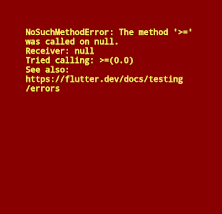
DART EXCEPTION HANDLING PARSING Change string value to double void main (){ String myString = 'abc' ; double myStringAsdouble = double. parse (myString) ; print(myStringAsdouble + 56 ) ; } Used example in a program how to use try and catch Catch takes the error and print in flutter terminal as written in code @override Widget build (BuildContext context) { String myString = "abc" ; double margin ; try { margin = double. parse (myString) ; } catch (e) { print(e) ; margin = 30 ; // use this or } return Scaffold ( body: Container ( margin: EdgeInsets . all (margin ?? 30 ) , // or use this color: Colors. grey , ) , ) ; } when margin takes value as 'abc' but it cant be converted into double so app return error message like below so we also give new margin value so that instead of that ('abc'), new value is used in a container DART NULL AWARE OPERATOR As above we use margin ??...
DART ENUM used for making user defined datatypes e.g. enum Car { suv, hatchback, coupe, luxury } Now Car become a user datatypes and this contain these above names call Car.suv , Car.coupe etc. In any func. we may write like Car cartype here cartype is variable under Car datatypes DART TERNARY OPERATOR Replacement for if else statement if( cond. ) { .cond true then if runs................. } else { cond. rong then else } TERNARY OPERATOR SYNTAX ...
Refractor Same code of widget in different widget can be shorten by making new widget by refractor example Container ( margin: EdgeInsets . all ( 15 ) , decoration: BoxDecoration ( color: Color ( 0xFF1d1f33 ) , borderRadius: BorderRadius . circular ( 12 ) , this above code is used multiple times in different widget so we use refractor then by refractor we can name new widget replacing this above code example -- ReusableCard () , by Refracting, this code made by android studio A Key is an identifier for Widget s, Element s and SemanticsNode s. class ReusableCard extends StatelessWidget { const ReusableCard({ Key key , }) : super (key: key) ; @override Widget build (BuildContext context) { return Container ( margin: EdgeInsets . all ( 15 ) , decoration: BoxDecoration ( color: Color ( 0xFF1d1f33 ) , borderRadius: BorderRadius . circular ( 12 ) , ) , ) ; } }
ThemeData class theme: ThemeData( primaryColor: Colors.blue, accentColor: Colors.green, textTheme: TextTheme(bodyText2: TextStyle(color: Colors.purple)), ), and many other properties in this. for whole app theme: ThemeData . dark ().copyWith( // c opywith for showing body text we primaryColor: Color ( 0xFF0a0d22 ) , can also take only themedata scaffoldBackgroundColor: Color ( 0xFF090c21 ) , ) , For particular icon floatingActionButton: Theme ( data: ThemeData ( accentColor: Colors. purple , ) , child: FloatingActionButton ( child: Icon (Icons. add ) , ) , ) ,